A TLS 1.3 Question That Probably Cost Me a Job
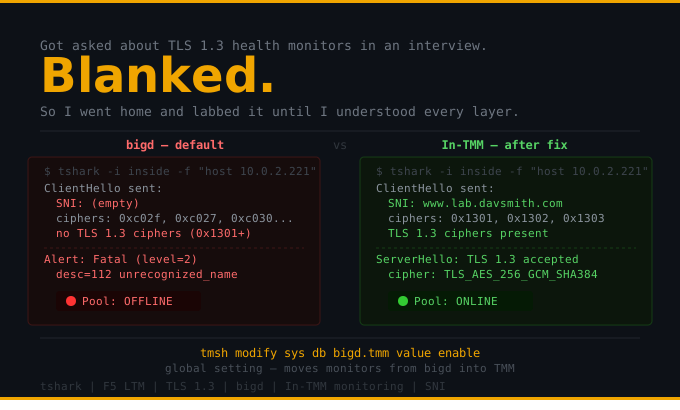
Got asked about TLS 1.3 health monitors in an interview. Blanked. Walked out knowing I didn’t have it.
So I went home and labbed it until I understood every layer of what was actually happening — and why nobody’s blog post explains it clearly.
This is for the engineers who, like me, have been heads-down on operations and missed a few laps around the F5 feature track.
I was bummed, so I brought it up with a good friend of mine named Mike. He said “This may look like a failure, but you are in the right mindset. You are looking to fill that gap with knowledge so you will never be tripped up by that question again. Let me explain a few things to you…” So he did, and a lightbulb came on. Everything made sense. He also gave me some advice I think I will be taking to my grave: the best way to remember something is to teach it. That is the inspiration of this article.
Scenario: You are an F5 LTM administrator and your business asks you to update the server-side SSL connections to TLS 1.3 because regulations require end-to-end encryption with a fast, robust protocol. No problem! You metaphorically head over to the staging lab where the server team has already done their part — all the servers now require TLS 1.3 connections and the pool members are down. You make the needed adjustments to your Server SSL profiles and… everything is still down. Hmm. You confirm the server team set everything up correctly. Still a red ball. You are searching the web, reading docs, and nothing is really standing out — maybe you are asking the wrong questions, or you found the answer and it worked, but you don’t exactly know why.
The Problem: bigd and TLS 1.3 Don’t Get Along
Here is the simple, quick answer — especially if you are using SNI. The problem is with the limited SSL stack running in bigd, the process that handles F5 health monitors by default. Even if you could update the SSL stack in bigd, there is a second, separate problem: bigd only knows IP addresses. It has no hostname context to put in the SNI field. So the SNI field in the ClientHello comes out blank, and your backend server — which requires strict SNI — fires back a fatal alert and slams the door. You can clearly see both of these failures in tshark, and I will show you exactly what that looks like.
I had to understand this so I don’t end up in the position I was in at the beginning of this story. So I spent the weekend setting up a lab with a few nginx servers running a couple of pages, offering only TLS 1.3 with strict server name enforcement. I configured my 443 Virtual Server with SSL offloading so I was sending traffic to the servers on port 80. I then started my scenario.
I wanted to make sure there was no downtime to the site (to speak of). I built out my Server SSL profile with only TLS 1.3 support and the server-name field set to my website name (www.lab.davsmith.com). I then set up my HTTPS monitor applying my newly created Server SSL profile. Continuing, I built out my 443 pool with the previously mentioned monitor. The pool did not come up. I then set up a couple of tshark captures to see the traffic in flight. (described in detail below)
Step 1 — Enable In-TMM Monitoring and Watch the Pool Come Up
The fix is to enable In-TMM monitoring. This moves the monitoring process out of the bigd daemon into TMM — the Traffic Management Microkernel — where it has the full TLS stack, knows about hostnames, and can properly populate the SNI field. It also happens to be faster and more efficient without the bigd overhead.
I asked myself: “Why is this not enabled by default?” The main reason is that it moves processing into TMM and could — and has — destabilized traffic processing. There are other reasons too, like a known bug with monitor timeouts, backwards compatibility concerns, and stricter HTTP compliance that can break poorly formatted existing monitors. The possibility of destabilizing traffic flow is a pretty big one for most folks, so F5 ships it off and lets you opt in.
The command is a global database variable — it applies to all monitors on the system, not just one:
tmsh modify sys db bigd.tmm value enable⚠️ Side Quest Note: The
server-namefield in your Server SSL profile must have the full hostname associated with the cert (wildcard or exact), AND your servers must actually answer to that name. In my case I had to setwww.lab.davsmith.comup as an alias on the backend servers. This cost me a few hours of troubleshooting. I am not a web server admin… yet. Also — and this one stings — theHost:header in your monitor send string has to match that same hostname. If it doesn’t, you will get a 200 from tshark and a red ball from the pool. Ask me how I know.
The tshark Proof
This is where it gets good. Let me show you exactly what is happening on the wire, before and after.
Testing Protocol
- BIG-IP LTM is doing SSL offloading on Virtual Server
lab.davsmith.com-443. Backend pool is on port 80. - Create new pool going to backend servers using port 443.
- Create new Server SSL profile with TLS 1.3 only (
S-TLS_1.3-only). - Create new monitor
MON-HTTPS-TLS13and apply the new Server SSL profile.- Check pool → down
- Run tshark → find the reason
- Enable In-TMM monitoring.
- Check pool → UP
- Run tshark → see what the communication should look like
- Apply Server SSL profile and new pool to the Virtual Server.
- Test with cURL or your favorite browser.
4.1 — In-TMM Monitoring Disabled. Pool is Down.
root@(bigip201)(cfg-sync In Sync)(Active)(/Common)(tmos)# list sys db bigd.tmm
sys db bigd.tmm {
    value "disable"
}

Ltm::Pool: pool-443-tls13-lab
  Availability : offline
  Reason       : The children pool member(s) are down
  Available Members : 0

  | Ltm::Pool Member: web-221.lab.davsmith.com:443
  |   Availability : offline
  |   Reason       : MON-HTTPS-TLS13: No successful responses received before deadline.
  |   Monitor Status : down
4.2 — tshark Shows Why the Health Checks Are Failing
10.0.2.201 = BIG-IP 201 Self IP (the monitor / client side) 10.0.2.221 = Pool member web-221 (the server side)
# Command:
tshark -i inside -f "host 10.0.2.221 and port 443" \
  -T fields \
  -e frame.time -e ip.src -e ip.dst \
  -e tls.record.content_type \
  -e tls.alert_message.level \
  -e tls.alert_message.desc \
  -e tls.handshake.type \
  -e tls.handshake.ciphersuite \
  -e tls.handshake.extensions_server_name \
  2>/dev/null

Apr 14, 2026 22:12:34.630301000    10.0.2.201 → 10.0.2.221    ← TCP SYN        (1 of 3-way handshake)
Apr 14, 2026 22:12:34.630895000    10.0.2.221 → 10.0.2.201    ← TCP SYN-ACK    (2 of 3-way handshake)
Apr 14, 2026 22:12:34.631186000    10.0.2.201 → 10.0.2.221    ← TCP ACK        (3 of 3-way handshake — connection established)

Apr 14, 2026 22:12:34.631308000    10.0.2.201 → 10.0.2.221    content_type=22, handshake_type=1, ciphers=0xc02f,0xc027,...  SNI=(empty)
                                                                ↑ Content type 22 = TLS Handshake
                                                                ↑ Handshake type 1 = ClientHello
                                                                ↑ Ciphers offered are TLS 1.2 — no TLS 1.3 ciphers (0x1301/1302/1303)
                                                                ↑ SNI field is BLANK — bigd has no hostname context to send

Apr 14, 2026 22:12:34.632043000    10.0.2.221 → 10.0.2.201    ← TCP ACK

Apr 14, 2026 22:12:34.632300000    10.0.2.221 → 10.0.2.201    content_type=21, alert_level=2, alert_desc=112
                                                                ↑ Content type 21 = TLS Alert
                                                                ↑ Alert level 2 = Fatal (this is not a warning — the server is done)
                                                                ↑ Alert description 112 = unrecognized_name (no SNI = no idea who you are)

Apr 14, 2026 22:12:34.632327000    10.0.2.221 → 10.0.2.201    ← TCP FIN-ACK    (server closes the connection)
Apr 14, 2026 22:12:34.632547000    10.0.2.201 → 10.0.2.221    ← TCP ACK
Apr 14, 2026 22:12:34.632593000    10.0.2.201 → 10.0.2.221    ← TCP FIN-ACK    (BIG-IP acknowledges defeat)
Apr 14, 2026 22:12:34.633505000    10.0.2.221 → 10.0.2.201    ← TCP ACK        (session wrapped up)
The same story in the more familiar tshark output:
tshark -i inside -f "host 10.0.2.221 and port 443" 2>/dev/null

  1  0.000000   10.0.2.201 → 10.0.2.221   TCP   [SYN]                     ← 3-way handshake starts
  2  0.013542   10.0.2.221 → 10.0.2.201   TCP   [SYN, ACK]
  3  0.014280   10.0.2.201 → 10.0.2.221   TCP   [ACK]                     ← TCP connected
  4  0.014327   10.0.2.201 → 10.0.2.221   TLSv1 Client Hello              ← bigd sends TLSv1 ClientHello — no SNI, no TLS 1.3 ciphers
  5  0.016008   10.0.2.221 → 10.0.2.201   TCP   [ACK]
  6  0.016050   10.0.2.221 → 10.0.2.201   TLSv1.2 Alert (Fatal, Unrecognized Name)  ← server rejects — doesn't know who you are
  7  0.016060   10.0.2.221 → 10.0.2.201   TCP   [FIN, ACK]                ← server closes the connection
  8  0.016333   10.0.2.201 → 10.0.2.221   TCP   [ACK]
  9  0.016360   10.0.2.201 → 10.0.2.221   TCP   [FIN, ACK]                ← BIG-IP closes its side
 10  0.029553   10.0.2.221 → 10.0.2.201   TCP   [ACK]                     ← done. pool member marked DOWN.
Two problems visible right there on the wire:
- Line 4: bigd sends a TLSv1 ClientHello — not TLS 1.3. The ciphers it offers are old. The server requires TLS 1.3 and doesn’t care.
- Line 4: The SNI field is empty — bigd only knows the pool member’s IP address. No hostname, no SNI.
- Line 6: The server fires back a Fatal Alert 112 (unrecognized_name) and closes the door.
The backend server is perfectly healthy. It just has no idea who is knocking.
5.1 — Enable In-TMM Monitoring. Pool Comes Up.
root@(bigip201)(cfg-sync In Sync)(Active)(/Common)(tmos)# modify sys db bigd.tmm value enable
root@(bigip201)(cfg-sync In Sync)(Active)(/Common)(tmos)# list sys db bigd.tmm
sys db bigd.tmm {
    value "enable"
}

Ltm::Pool: pool-443-tls13-lab
  Availability : available
  Reason       : The pool is available
  Available Members : 3

  | Ltm::Pool Member: web-221.lab.davsmith.com:443  → Monitor Status: up ✅
  | Ltm::Pool Member: web-222.lab.davsmith.com:443  → Monitor Status: up ✅
  | Ltm::Pool Member: web-223.lab.davsmith.com:443  → Monitor Status: up ✅
5.2 — tshark Shows What a Healthy TLS 1.3 Handshake Looks Like
Apr 14, 2026 23:07:44.972299000    10.0.2.201 → 10.0.2.221    ← TCP SYN
Apr 14, 2026 23:07:44.973024000    10.0.2.221 → 10.0.2.201    ← TCP SYN-ACK
Apr 14, 2026 23:07:44.973109000    10.0.2.201 → 10.0.2.221    ← TCP ACK         (3-way handshake complete)

Apr 14, 2026 23:07:44.973145000    10.0.2.201 → 10.0.2.221    content_type=22, handshake_type=1
                                                                ciphers=0xc013,0xc014,0x002f,0x0035,0x1301,0x1302,0x1303,0x00ff
                                                                SNI=www.lab.davsmith.com
                                                                ↑ Content type 22 = TLS Handshake
                                                                ↑ Handshake type 1 = ClientHello
                                                                ↑ 0x1301, 0x1302, 0x1303 = TLS 1.3 cipher suites — now present
                                                                ↑ SNI = www.lab.davsmith.com — TMM knows the hostname. Server knows who's knocking.

Apr 14, 2026 23:07:44.973744000    10.0.2.221 → 10.0.2.201    ← TCP ACK

Apr 14, 2026 23:07:44.974451000    10.0.2.221 → 10.0.2.201    content_type=22,20, handshake_type=2, cipher=0x1302
                                                                ↑ Content type 22 = Handshake, 20 = ChangeCipherSpec (compatibility)
                                                                ↑ Handshake type 2 = ServerHello
                                                                ↑ 0x1302 = TLS_AES_256_GCM_SHA384 — TLS 1.3 cipher selected ✅
                                                                ↑ Handshake completes. Everything after this is encrypted application data.
The more familiar output, this time from web-222:
tshark -i inside -f "host 10.0.2.222 and port 443" 2>/dev/null

  1  0.000000   10.0.2.201 → 10.0.2.222   TCP     [SYN]
  2  0.001812   10.0.2.222 → 10.0.2.201   TCP     [SYN, ACK]
  3  0.001913   10.0.2.201 → 10.0.2.222   TCP     [ACK]                                 ← TCP connected
  4  0.001945   10.0.2.201 → 10.0.2.222   TLSv1   Client Hello                          ← TMM sends ClientHello with SNI + TLS 1.3 ciphers
  5  0.003176   10.0.2.222 → 10.0.2.201   TCP     [ACK]
  6  0.003971   10.0.2.222 → 10.0.2.201   TLSv1.3 Server Hello, Change Cipher Spec, Application Data  ← TLS 1.3 accepted. Done in 1 round trip.
Night and day.
Final Config
ltm profile server-ssl S-TLS_1.3-only {
    cipher-group TLS1.3
    options { dont-insert-empty-fragments no-ssl no-tlsv1 no-tlsv1.1 no-tlsv1.2 no-dtlsv1.2 }
    server-name www.lab.davsmith.com
    defaults-from serverssl
}

ltm monitor https MON-HTTPS-TLS13 {
    interval 5
    timeout 16
    recv 200
    send "HEAD /health HTTP/1.1\r\nHost: www.lab.davsmith.com\r\nConnection: Close\r\n\r\n"
    ssl-profile /Common/S-TLS_1.3-only
    defaults-from https
}

ltm pool pool-443-tls13-lab {
    members {
        web-221.lab.davsmith.com:https { address 10.0.2.221 }
        web-222.lab.davsmith.com:https { address 10.0.2.222 }
        web-223.lab.davsmith.com:https { address 10.0.2.223 }
    }
    monitor MON-HTTPS-TLS13
}

ltm virtual lab.davsmith.com-443 {
    destination 10.0.1.101:https
    pool pool-443-tls13-lab
    profiles {
        C-TLS_1.3-only { context clientside }
        S-TLS_1.3-only { context serverside }
        tcp { }
    }
    serverssl-use-sni enabled
}

sys db bigd.tmm {
    value "enable"
}
End-to-end curl from the workstation confirms the full path is working:
david@xorg:~$ curl -IvL --tlsv1.3 https://www.lab.davsmith.com/health

* Connected to www.lab.davsmith.com (10.0.1.101) port 443
* TLSv1.3 (OUT), TLS handshake, Client hello (1)
* TLSv1.3 (IN), TLS handshake, Server hello (2)
* TLSv1.3 (IN), TLS handshake, Encrypted Extensions (8)
* TLSv1.3 (IN), TLS handshake, Certificate (11)
* TLSv1.3 (IN), TLS handshake, CERT verify (15)
* TLSv1.3 (IN), TLS handshake, Finished (20)
* SSL connection using TLSv1.3 / TLS_AES_128_GCM_SHA256 / X25519 / id-ecPublicKey
* Server certificate:
*   subject: CN=*.lab.davsmith.com
*   subjectAltName: host "www.lab.davsmith.com" matched cert's "*.lab.davsmith.com"
*   SSL certificate verify ok.

< HTTP/1.1 200 OK
Takeaway
My overall takeaway from this experience is a good one. I got to spend an hour in an interview with someone who was very knowledgeable and quickly found my weak points. He did not just write me off and end the interview — he spent his valuable time and gave me some clues on where the gaps were and how to fill them. Although I am pretty sure I did not get that job, I will have a positive memory of that interview and how it made me dig a little deeper to start rebuilding the knowledge I lost while working on other projects.
Even though this was a disappointing — but ultimately good — experience, I can apply the same strategy to the bad experiences I will probably have in future interviews. The lab I built will be a great learning tool and I plan to spend a lot of time in it studying for the next chapter in my career.
I only thought I understood these concepts after Mike explained it, but writing this article and wanting to make sure I got it right forced me to dig deeper and make sure I “Got it”. Mike was right. Teaching it is how you own it.
Comments
Comments are powered by GitHub Discussions via Giscus. Sign in with your GitHub account to leave a reply or a reaction.